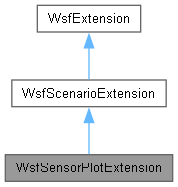
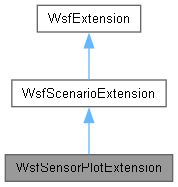
#include <WsfSensorPlot.hpp>
◆ WsfSensorPlotExtension() [1/2]
| WsfSensorPlotExtension::WsfSensorPlotExtension |
( |
WsfSensorPlotApplicationExtension * | aAppExtensionPtr | ) |
|
|
explicit |
◆ ~WsfSensorPlotExtension()
| WsfSensorPlotExtension::~WsfSensorPlotExtension |
( |
| ) |
|
|
overridedefault |
◆ WsfSensorPlotExtension() [2/2]
◆ AddedToScenario()
| void WsfSensorPlotExtension::AddedToScenario |
( |
| ) |
|
|
overridevirtual |
Called when the extension has been added to the scenario. This is typically used to register new component type objects and object factories, e.g.:
WsfAntennaPatterTypes::Get(scenario).AddObjectFactor(MyAntennaPattern::ObjectFactory);
static WSF_EXPORT WsfMoverTypes & Get(WsfScenario &aScenario)
Return a modifiable reference to the type list associated with the specified scenario.
Definition WsfMoverTypes.cpp:53
bool AddCoreType(WsfStringId aId, std::unique_ptr< T > aDefinitionPtr)
Definition WsfObjectTypeList.hpp:102
WsfScenario & GetScenario() const
Definition WsfScenarioExtension.hpp:46
friend class WsfScenario
Definition WsfScenarioExtension.hpp:39
Script classes must NOT be registered here because they are global to the entire application. They should be registered in WsfApplication::AddedToApplication.
- Note
- GetScenario() and GetApplication() are now valid.
Reimplemented from WsfScenarioExtension.
References RegisterFunction().
◆ Complete2()
| bool WsfSensorPlotExtension::Complete2 |
( |
| ) |
|
|
overridevirtual |
◆ EnableSensorPlotMode()
| void WsfSensorPlotExtension::EnableSensorPlotMode |
( |
| ) |
|
|
static |
◆ ExecutePlots()
| bool WsfSensorPlotExtension::ExecutePlots |
( |
| ) |
|
◆ Find()
◆ IsSensorPlotMode()
| bool WsfSensorPlotExtension::IsSensorPlotMode |
( |
| ) |
|
|
static |
◆ operator=()
◆ ProcessInput()
| bool WsfSensorPlotExtension::ProcessInput |
( |
UtInput & | aInput | ) |
|
|
overridevirtual |
Process potential input for the extension. This method examines the current input command to determine if it is one that is recognized by the extension. If it is one recognized by the extension then it processes the command and returns 'true', otherwise it returns 'false'.
- Parameters
-
| aInput | a reference to a UtInput object. |
- Returns
- 'true' if the command was one recognized by the extension or 'false' if not.
- Exceptions
-
| UtInput::ExceptionBase | (or an object derived from it) if the command was recognized but contains some sort of error. |
Reimplemented from WsfScenarioExtension.
References WsfScenarioExtension::GetScenario(), and MapPlotFunction::RegisterMapPlotVariable().
◆ RegisterFunction()
template<class T>
| void WsfSensorPlotExtension::RegisterFunction |
( |
const std::string & | aCommandName | ) |
|
|
inline |
◆ RegisterMapPlotVariable()
| void WsfSensorPlotExtension::RegisterMapPlotVariable |
( |
const std::string & | aVarName, |
|
|
std::shared_ptr< MapPlotVariable > | aVariablePtr ) |
Plugins or projects that register a new MapPlotVariable type must call this at application startup to register their new types.
Once registered the types will be injected into ProcessInput() chain of MapPlotFunction derivatives.
- Parameters
-
| aVarName | The script name of the new variable type to be used by MapPlotFunction derived plotting classes. |
| aVariablePtr | When a plotting value of type varName is encountered this variable function will be invoked to process the data. |
The documentation for this class was generated from the following files: