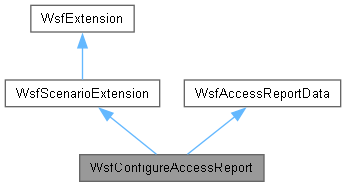
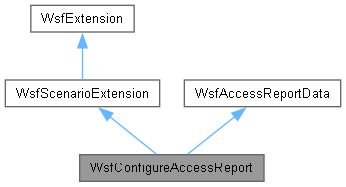
The scenario extension used to configure the access reports object. More...
#include <WsfAccessReport.hpp>
Public Member Functions | |
| bool | Complete () override |
| bool | ProcessInput (UtInput &aInput) override |
| void | SimulationCreated (WsfSimulation &aSimulation) override |
| Public Member Functions inherited from WsfScenarioExtension | |
| WsfScenarioExtension () | |
| ~WsfScenarioExtension () override | |
| WsfScenario & | GetScenario () const |
| WsfApplication & | GetApplication () const |
| virtual void | AddedToScenario () |
| virtual void | FileLoaded (const std::string &aFileName) |
| virtual bool | Complete2 () |
| virtual bool | AlwaysCreate () |
| Public Member Functions inherited from WsfExtension | |
| virtual | ~WsfExtension ()=default |
| const std::string & | GetExtensionName () const |
| Public Member Functions inherited from WsfAccessReportData | |
| WsfAccessReportData () | |
Additional Inherited Members | |
| Public Types inherited from WsfAccessReportData | |
| using | DetectionIntervalList = std::list<DetectionInterval> |
| using | DetectorDetecteeMap = std::map<DetectorDetecteeKey, DetectionIntervalList> |
| using | KeyInputs = std::list<DetectorDetecteeKey> |
| Public Attributes inherited from WsfAccessReportData | |
| KeyInputs | mKeyInputs |
| DetectorDetecteeMap | mDetectorDetecteeMap |
| std::string | mDefaultSensor |
| std::string | mFileName |
| std::string | mFormat |
| Protected Member Functions inherited from WsfExtension | |
| void | InitializeExtensionName (const std::string &aName) |
Detailed Description
The scenario extension used to configure the access reports object.
Member Function Documentation
◆ Complete()
|
overridevirtual |
Called when all inputs are processed. This is called when the application calls WsfScenario::LoadComplete to signify that all input data has been loaded into the scenario. The extension should perform any additional validity checking or other processing on its input data. Constant data may be created and stored here. Unless Complete2() is also implement, the contents of this class should not be changed after this call.
The extension should not assume anything about the state of another extension unless this a dependency has been registered to ensure the other extension has been called prior to this, e.g.:
- Returns
- 'true' if no problems or 'false' if an error occurred that would prevent execution.
!! This is called from WsfScenario::LoadComplete, and does not use the return value. !! (TODO) need to examine WsfScenario to see how to properly handle LoadComplete errors. !! For now throwing UtExceptions from here to prevent simulation crash.
Reimplemented from WsfScenarioExtension.
References WsfComponentList::RoleIterator< T >::AtEnd(), WsfComponentList::GetComponent(), WsfComponentList::GetComponentCount(), WsfPlatform::GetComponents(), WsfScenario::GetInputPlatformByName(), WsfScenario::GetInputPlatformCount(), WsfScenario::GetInputPlatformEntry(), WsfObject::GetName(), WsfScenarioExtension::GetScenario(), WsfAccessReportData::mDefaultSensor, WsfAccessReportData::DetectorDetecteeKey::mDetectee, WsfAccessReportData::DetectorDetecteeKey::mDetector, WsfAccessReportData::mDetectorDetecteeMap, WsfAccessReportData::mKeyInputs, and WsfAccessReportData::DetectorDetecteeKey::mSensorName.
◆ ProcessInput()
|
overridevirtual |
Process potential input for the extension. This method examines the current input command to determine if it is one that is recognized by the extension. If it is one recognized by the extension then it processes the command and returns 'true', otherwise it returns 'false'.
- Parameters
-
aInput a reference to a UtInput object.
- Returns
- 'true' if the command was one recognized by the extension or 'false' if not.
- Exceptions
-
UtInput::ExceptionBase (or an object derived from it) if the command was recognized but contains some sort of error.
Reimplemented from WsfScenarioExtension.
References WsfAccessReportData::mDefaultSensor, WsfAccessReportData::mFileName, WsfAccessReportData::mFormat, and WsfAccessReportData::mKeyInputs.
◆ SimulationCreated()
|
overridevirtual |
Called when a simulation has been created. (Technically this is called upon entry to WsfSimulation::Initialize()). This is typically used when a scenario extension also requires a simulation extension. The method would typically register the simulation extension as follows:
- Parameters
-
aSimulation The simulation that is being created. See note below!
- Note
- This is called upon entry to WsfSimulation::Initialize() and nothing can be assumed about the state of the simulation.
Reimplemented from WsfScenarioExtension.
References WsfExtension::GetExtensionName(), WsfAccessReportData::mKeyInputs, and WsfSimulation::RegisterExtension().
The documentation for this class was generated from the following files: