#include <WsfApplicationExtension.hpp>
Public Member Functions | |
| WsfApplicationExtension () | |
| Constructor. | |
| ~WsfApplicationExtension () override | |
| WsfApplication & | GetApplication () const |
| Public Member Functions inherited from WsfExtension | |
| virtual | ~WsfExtension ()=default |
| const std::string & | GetExtensionName () const |
Friends | |
| class | WsfApplication |
Notifications from WsfApplication to support 'standard application' methods. | |
| virtual int | ProcessCommandLine (WsfStandardApplication::Options &aOptions, int aArgc, char *aArgv[]) |
| virtual void | PrintCommandLineArguments () const |
| virtual void | PrintGrammar (std::ostream &aOut) |
| virtual void | ProcessCommandLineCommands () |
Notifications from WsfApplication. | |
| virtual void | AddedToApplication (WsfApplication &aApplication) |
| virtual void | ScenarioCreated (WsfScenario &aScenario) |
| virtual void | SimulationCreated (WsfSimulation &aSimulation) |
Additional Inherited Members | |
| Protected Member Functions inherited from WsfExtension | |
| void | InitializeExtensionName (const std::string &aName) |
Detailed Description
An application extension represents an optional capability that can be added to an application.
An application extension provides an interface to add functionality to a scenario or simulation. A program creates a WsfApplication object and registers the desired application extensions to provide the capabilities it requires.
The program registers application extensions using:
This is acceptable if the program knows if the list of extensions is always the same. If, however, the list varies then it becomes unwieldy to maintain not only the program but the associated CMake files. To alleviate this problem a convention has been developed to allow the definition of 'optional' extensions that can be automatically included or excluded from a build simply by their presence or absence from the build directory. To make use of this capability:
- Prepare the extension directory according to conventions (described elsewhere). This means creating a few files that allow CMake to include the extension in the build automatically.
-
Add the following code at the bottom of the main implementation file for the extension. For example, at the bottom of the MyExtension.cpp the following would be inserted: void Register_my_extension(WsfApplication& aApplication){}friend class WsfApplicationDefinition WsfApplicationExtension.hpp:88void RegisterExtension(const std::string &aName, std::unique_ptr< WsfApplicationExtension > aExtensionPtr)Definition WsfApplication.cpp:173
-
Add the following to the main program: #include "wsf_extensions.hpp" // This file automatically generated by 'CMake'....{WsfApplication app;// Registers standard extensions available in all WSF applications (dis_interface, event_output, etc.)RegisterBuiltInExtensions(app);// Registers optional extensions that are present in the build directoryRegisterOptionalExtensions(app);...}
Following this convention allows the extension to be included or excluded from the application based simply on its presence or absence from the build tree. Even if one does not want to use the capability, it still simplifies the main program by eliminating the need for the include file:
Constructor & Destructor Documentation
◆ WsfApplicationExtension()
| WsfApplicationExtension::WsfApplicationExtension | ( | ) |
Constructor.
Referenced by engage::ApplicationExtension::ApplicationExtension(), and WsfApplication.
◆ ~WsfApplicationExtension()
|
override |
Member Function Documentation
◆ AddedToApplication()
|
virtual |
Called in response to WsfApplication::RegisterExtension. This is typically used to register script classes and methods, e.g.:
- Note
- GetApplication() is now valid.
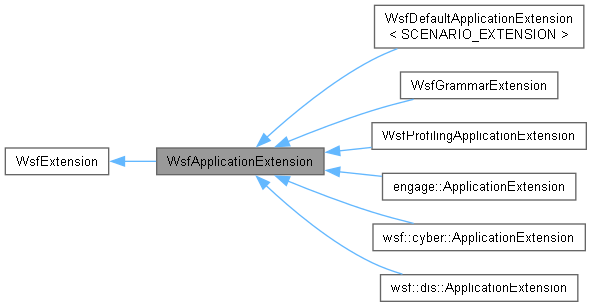
Reimplemented in engage::ApplicationExtension, wsf::cyber::ApplicationExtension, and wsf::dis::ApplicationExtension.
References WsfApplication.
◆ GetApplication()
|
inline |
Returns the application to which this extension is registered.
- Note
- This is not valid until AddedToApplication() has been called.
References WsfApplication.
◆ PrintCommandLineArguments()
|
virtual |
Called by WsfApplication::ShowUsage to let the application display its supported arguments. The usage should be displayed on standard output.
Reimplemented in WsfProfilingApplicationExtension.
Referenced by WsfStandardApplication::ShowUsage().
◆ PrintGrammar()
|
virtual |
If the extension provides input processing, this method can output the associated grammar. This is not necessary if the extension installs a .ag file in the appropriate location.
- Parameters
-
aOut The output stream to which the grammar should be written.
◆ ProcessCommandLine()
|
virtual |
Called by WsfApplication::ProcessCommandLine to examine the current argument and process if necessary. If the application extension recognizes the argument, this method should return the number of entries processed.
- Parameters
-
aOptions The application options used to start the application aArgc The number of arguments remaining in the argument list. aArgv Any array of the arguments remaining in the argument list.
- Returns
- The number of arguments processed.
Reimplemented in WsfGrammarExtension, and WsfProfilingApplicationExtension.
Referenced by WsfStandardApplication::ProcessCommandLine().
◆ ProcessCommandLineCommands()
|
virtual |
Called by WsfApplication::ProcessCommandLineCommands to let the application extension process any commands included in the command line.
Reimplemented in WsfGrammarExtension.
Referenced by WsfStandardApplication::ProcessCommandLineCommands().
◆ ScenarioCreated()
|
virtual |
Called in response to the creation of a WsfScenario object. This is called at the end of the WsfScenario constructor. A derived class may provide this method to do the following:
-
Register a scenario extension to register new types and access the input stream to interpret commands, e.g.: aScenario.RegisterExtension("my_extension", new MyScenarioExtension);
-
If a scenario extension is not being created, register new type objects or object factories, e.g.: aScenario.GetMoverTypes().AddCoreType("MY_MOVER", new MyMover(aScenario));aScenario.GetAntennaPatternTypes().AddObjectFactor(MyAntennaPattern::ObjectFactory);
- Parameters
-
aScenario The scenario object that is being created.
- See also
- WsfScenarioExtension.
Reimplemented in engage::ApplicationExtension, wsf::cyber::ApplicationExtension, wsf::dis::ApplicationExtension, and WsfDefaultApplicationExtension< SCENARIO_EXTENSION >.
◆ SimulationCreated()
|
virtual |
Called in response to the creation of a WsfSimulation object. This is actually called when the WsfSimulation::Initialize() is called. A derived class will override this method if it needs to concern itself the creation of a simulation.
Notes concerning creation of simulation extensions:
-
If an application extension requires a simulation extension but not a scenario extension (probably a rare occurrence), then the simulation extension should be created here, e.g.: aSimulation.RegisterExtension("my_extension", new MySimulationExtension);
- If, however, the application extension requires both a scenario extension (created by WsfApplicationExtension::ScenarioCreated) and a simulation extension, the simulation extension should be created in WsfScenarioExtension::SimulationCreated. This ensures that any dependencies registered by WsfApplication::ExtensionDepends are honored.
- Parameters
-
aSimulation The simulation object that is being created.
- See also
- WsfSimulationExtension.
Reimplemented in engage::ApplicationExtension.
Friends And Related Symbol Documentation
◆ WsfApplication
|
friend |
References WsfApplication, and WsfApplicationExtension().
Referenced by engage::ApplicationExtension::AddedToApplication(), wsf::cyber::ApplicationExtension::AddedToApplication(), wsf::dis::ApplicationExtension::AddedToApplication(), AddedToApplication(), WsfGrammarExtension::Find(), GetApplication(), WsfApplication, wsf::cyber::ApplicationExtension::~ApplicationExtension(), and wsf::dis::ApplicationExtension::~ApplicationExtension().
The documentation for this class was generated from the following files: